
Connect your stores with Spain's carrier networks
Manage shipments from Shopify, WooCommerce or PrestaShop from a single panel. With one store or many, with one carrier or several at once, your whole operation stays in the same place: orders, labels and shipping rules.Manage your store's shipments from a single panel: orders, labels and carriers.

One platform, the numbers that matter
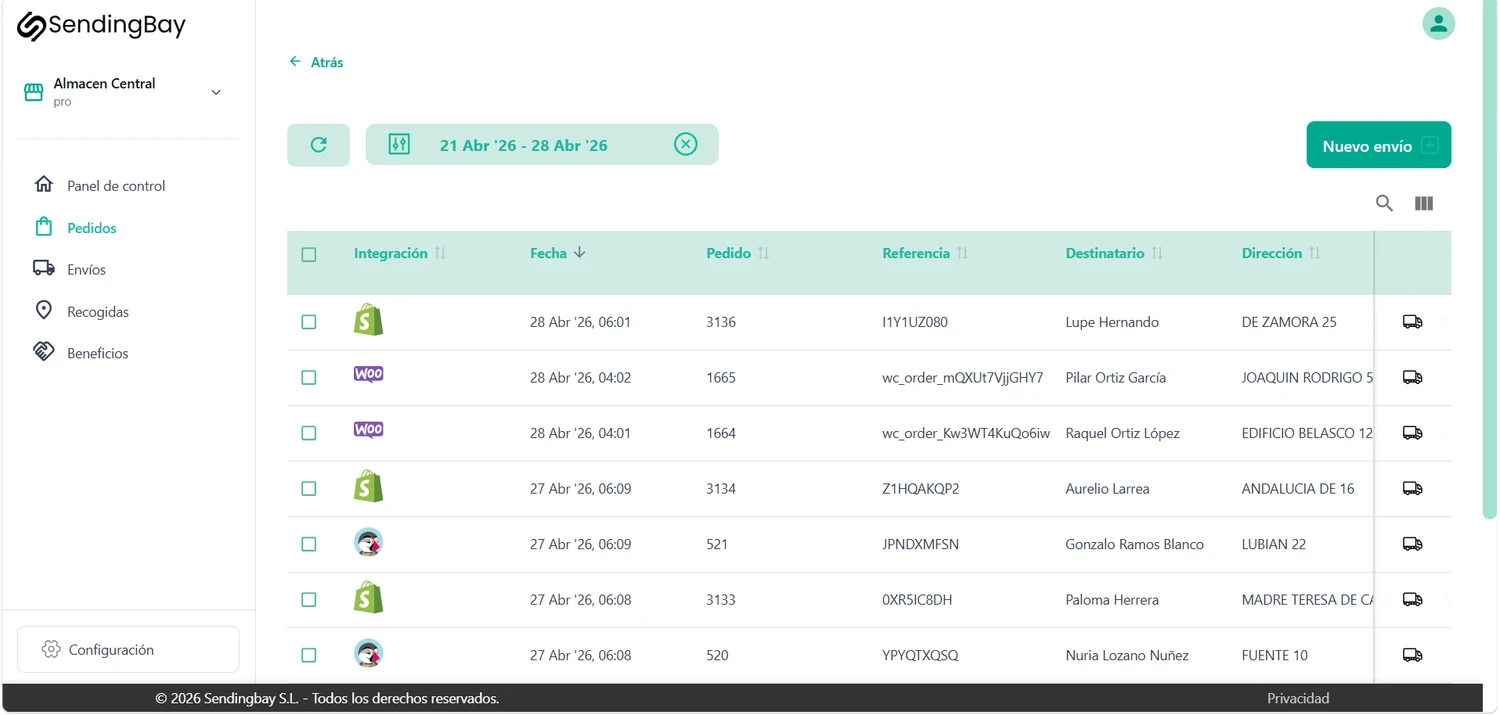
A single panel for your sales channels and your shipments
eComm brings together in a single panel the orders from all your sales channels and the shipment management with your carriers. Instead of jumping between the store, the carrier's website and the spreadsheet, you work from a single inbox.All your sales channels and your shipments in a single inbox, without jumping between tools.
- Centralized sales channels. Every order from Shopify, WooCommerce and PrestaShop in the same inbox, with no copying by hand.
- Connected carriers. You assign the right network to each shipment and generate the label without leaving the panel, in one click.
- Synced statuses. Tracking updates on its own and syncs back to your store, which keeps your customer informed.
Connect, configure, automate
You get eComm up and running in three steps: connect your store, set up your carriers and let shipments document themselves.In three steps: connect your store, set up your carriers and automate shipments.
Connect your store
Link Shopify, WooCommerce or PrestaShop in a few minutes. Don't have one of those? Upload your orders via CSV, Excel or TXT. Your orders start coming into the panel without touching anything else.
Set up your carriers
Connect your carrier and, if you have more than one, register them and set rules so the system knows when to use each one automatically.
Automate your shipments
eComm generates your order's label, one by one or in bulk. Your store receives the tracking and it updates automatically, so your customer is always up to date.
Integrate eComm with your e-commerce platform
Connect the store you already use. eComm works with the main platforms and keeps the connection to your carriers for you. And if your store is not among them, you can also start with no integration at all: upload your orders by CSV or Excel, or enter them by hand.Connect the store you already use; we keep the connection to the carriers.

- Connects with WooCommerce
- Manage your shipments
- Handle returns

- Connects with PrestaShop
- Works with PrestaShop 1.7, 8 and 9
- Manage your shipments
- Handle returns

- Connects with Shopify
- Manage your shipments
- Handle returns

- Upload by CSV, Excel or TXT
- Enter your orders by hand
- Handle them in the same inbox
All integrations: centralized orders · labels from the same place · rule-based assignment · synced tracking.
Connect with the main carrier networks
We connect your store to these networks and keep the connection working for you. And if you already have your own carrier, you add them too.








Why eComm and not a comparison tool
eComm is a multi-carrier connector. It doesn't hand you a price list and leave you on your own: it connects your store with the carrier network and manages the shipment end to end.A connector, not a comparison tool: it manages the shipment from label to tracking.
Connector, not comparison tool
We connect your store with your usual carriers and manage the full shipment, from label to tracking.
Monthly, no lock-in
You start with a small fee and pay for what you ship, month by month and with nothing tying you down. And if you prefer the annual plan, you pay for ten months instead of twelve: up front and with a commitment.
Local support
A team that understands Spanish e-commerce and helps in your time zone.
Growth without surprises
The cost per label drops as you ship more.
Try it free for 15 days. Then you pick a plan
You get full access during the trial, and when it ends you choose the plan that best fits your volume, stores and carriers.Full access during the trial, then you pick your plan.
- 1 user
- Unlimited carriers
- Unlimited stores
- Manual carrier assignment
- Up to 5 users
- Unlimited carriers
- Unlimited stores
- Carrier assignment with automatic rules
- Unlimited users
- Unlimited carriers
- Unlimited stores
- Carrier assignment with automatic rules
The 15 free days give full access. No card. See all SendingBay pricing.
We answer your questions about eComm
Sign up today. Start in minutes.
Connect your store, document your first shipment and see how everything looks from a single panel. No contracts, no card to tie down.